Who it is for
- Designers and developers pulling assets off a site they own or build for.
- Anyone who has bought or licensed a set of images and needs them in a usable form.
- Researchers and archivists collecting openly published material.
- Anyone tidying up a batch of files: consistent names, consistent format, one archive.
What it does
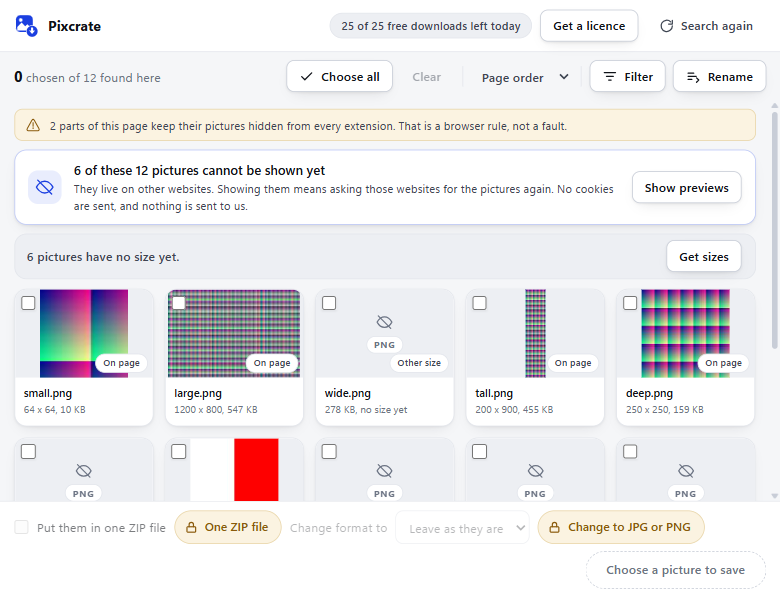
- Sees the page the way your browser does. It reads the images already loaded and rendered on the page you are viewing, including ones set as CSS backgrounds or placed inside web components, which a plain right-click can miss.
- Filters precisely. By width, height, aspect ratio, file type, file size and the site serving them, so you skip icons, spacers and tracking pixels. Every site listed comes from the one page you opened it on.
- Changes format. Converts pictures to PNG, JPG or WebP on your own device, so you get files your tools actually open. Included with a licence.
- Batch renames. Prefix, suffix, sequence numbers with zero-padding, and an option to keep original filenames.
- Exports as ZIP. One organised archive instead of a hundred loose downloads. Included with a licence.
- Stays on your machine. No account, no sign-in, no analytics, no server. Everything runs locally in your browser.
Free version
The extension is free to install and free to use. Scanning, filtering, previewing and batch renaming are unlimited, and you can download up to 25 images per day at no charge. The count resets at midnight in your own time zone.
A licence removes the daily limit and adds the two capabilities that need it: packaging into a single ZIP archive and converting image formats. It covers up to three of your own browsers or computers.
Pricing
Lifetime
Pay once, use forever. Unlimited downloads, no recurring charge.
Buy lifetime licenceMonthly
Unlimited downloads, billed monthly, recurring until you cancel. Cancel any time.
Subscribe monthly14-day refund, no reason required. Email us and we will process it. See the Refund Policy.
Prices in US dollars. Applicable sales tax, VAT or GST is calculated and shown at checkout. Payments are processed by Dodo Payments, our authorised reseller and Merchant of Record.
How you receive it
Digital delivery, nothing is shipped. Your licence key is emailed to the address you used at checkout, usually within a minute. You can also retrieve it at any time from your account with Dodo Payments.
How licensing works
Open the extension, click Get a licence at the top, and paste your key into the activation field. Your licence covers up to three of your own browsers or computers. To move it to another machine, open the extension on one you no longer use and choose Release this browser. Please do not share, resell or publish your key.
Guides
Written for the questions people actually arrive with, and honest about when you do not need an extension at all.
- How to download all the images on a web page. Four methods, what each one really gets you, and the five cases that quietly defeat naive tools.
- How to save a CSS background image. Why right-click offers nothing, and three ways to get the file anyway.
- Why image downloaders ask to read your data on all websites. What that warning grants, and how to judge an extension before installing it.
Support
Questions, bugs and feature requests: ryan.apoorv123@gmail.com, or see the contact page. Expect a reply within two business days.